What this prompt creates
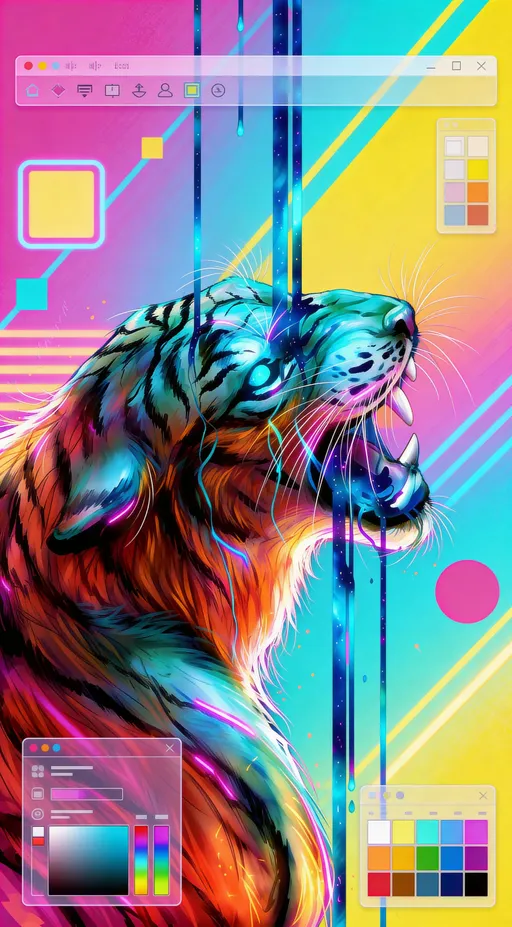
A vertical digital painting, clearly illustration rather than photography. A tiger's head in profile, jaws open and fangs showing, painted with fine fur strokes in orange, teal and pink. Behind it sit gradient fields of magenta, cyan and yellow, bold geometric squares, circles and stripes, and thin blue drips running down. Semi-transparent UI panels with colour pickers and palettes overlap the corners.
How to use this 1980s neon tiger illustration prompt
- Tap Copy prompt above to copy the full text.
- Open Seedream, or any image generator you prefer, and paste the prompt into a new chat or prompt box.
- Name your own subject in place of the vague "theme" line, such as an animal, car or skyline, and keep the neon palette and app-interface framing.
- Generate three or four versions and keep the one with the most convincing grain, color and light. Use the tips below if the result looks too modern.
Tips for this prompt
- State a subject explicitly, such as "a roaring tiger" or "a palm-lined coastline", so results stay consistent instead of the model guessing.
- Remove the UI interface sentence if you want clean poster art without the floating app windows and palettes.
- Add "laser grid horizon, chrome text, VHS scanlines" for a heavier synthwave flavour that leans more obviously toward the decade.
Who this prompt suits
App onboarding screens, design tool marketing, phone wallpapers, Dribbble-style concept shots and anyone who wants a loud synthwave-meets-interface illustration for a tech landing page or launch post.
What makes this prompt work
The prompt never names a subject, just "inspired by the theme", so the model chose the tiger itself; adding your own subject is the biggest lever. "80's palette with vibrant neon colors, gradients, and bold geometric shapes" drives the pink-cyan-yellow scheme and the squares and stripes. "Part of a modern UI design for a graphic design app interface" is why toolbars and swatch windows appear around the artwork.
Example image by Andrew Paris, shared publicly on OpenArt. The prompt is shown as originally posted.