What this prompt creates
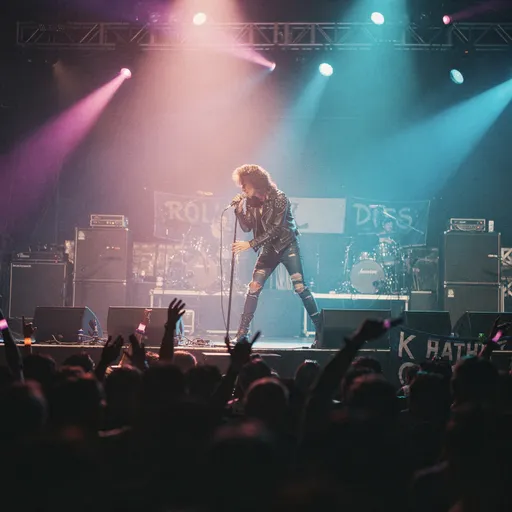
A rock frontman with a big curly perm, black leather jacket and torn skinny jeans leans into a mic stand on a modest stage. Amp stacks, a drum kit and hand-painted banners fill the back line, lighting-truss spots throw magenta and cyan cones through haze, and the audience is a dark mass of heads and raised arms. The palette is muted and warm, like pushed color film.
How to use this 1980s rock star concert photo prompt
- Tap Copy prompt above to copy the full text.
- Open Flux, or any image generator you prefer, and paste the prompt into a new chat or prompt box.
- Swap 'rock star' for your own performer type and describe the band banner or venue name you want, keeping the distant crowd viewpoint and colored haze.
- Generate three or four versions and keep the one with the most convincing grain, color and light. Use the tips below if the result looks too modern.
Tips for this prompt
- Add 'shot on Fujifilm 400, flash off, heavy grain' to deepen the pushed-film texture and make the highlights bloom more around the spotlights.
- Name a genre such as 'glam metal' or 'new wave' to steer hair, clothes and stage set toward a specific corner of the decade.
- Replace 'from a distance' with 'from the photo pit, low angle' for a dramatic close shot of the singer while keeping the lighting.
Who this prompt suits
Gig poster backgrounds, band biography pages, retro concert-themed social posts, podcast art about classic rock, and storyboards for films that need a believable small-venue show.
What makes this prompt work
The short phrase "from a distance" is the key choice: it keeps the performer small and puts the crowd between viewer and stage, which reads as an audience snapshot instead of a press shot. "80s rock star" handles the wardrobe and hair without extra description, and "performing on stage during a concert" pulls in truss lighting, amps and fans. Because nothing specifies lighting, the model defaults to colored haze beams that suit the decade well.
Example image by James Morrow, shared publicly on OpenArt. The prompt is shown as originally posted.